
Decision Matrix in Project Management: Key Takeaways
- A decision matrix helps compare multiple options against predefined decision criteria.
- Weighted decision matrix gives greater importance to criteria that impact project more.
- Decision matrix table makes comparisons comprehensive to discuss with stakeholders.
- Decision matrix template in Excel simplifies scoring and calculates weighted totals.
- A decision matrix supports structured and effective decision-making.
- It should be combined with professional judgment and risk assessment.
Project managers make decisions throughout the project lifecycle. A decision matrix allows project managers to evaluate alternatives using consistent scores and priorities. It sets aside personal preferences and relies on practical data and quantitative metrics.
In this guide, we’ll explain the decision matrix meaning, its role in project management, how to make a decision matrix, and provide a free decision matrix template in Excel.
Decision matrix meaning
A decision matrix is a decision-making tool that helps individuals and teams evaluate several alternatives against a common set of criteria. Each option receives a score based on how well it meets those criteria. The scores are then compared to identify the most suitable choice.
A decision matrix is also called a decision grid or a decision evaluation matrix. The evaluation process may involve simple scoring or weighted calculations based on the method used.
A decision matrix does not identify the perfect option. Its purpose is to make the decision process more transparent and consistent. Let’s take a quick look at how a decision matrix works next.
How does a decision matrix work?
A decision matrix works by placing the available options alongside the criteria used to evaluate them. Each option is scored against every criterion and the scores are combined to compare the alternatives.
A basic decision matrix treats all criteria equally. A weighted decision matrix assigns different levels of importance to each criterion before calculating the final score. The weighted approach is useful when some requirements matter more than others.
The general process involves three elements:
- Options: The alternatives being considered.
- Decision criteria: The factors used to evaluate each alternative.
- Scores and weights: The ratings assigned to each option and the relative importance of each criterion.
Once these elements are defined the project team can compare the results and discuss which option best meets the project’s needs. Now let’s look at a decision matrix example to understand it better.
Decision matrix table: example in project management
Suppose a project manager needs to select project management tools for a cross-functional team. The team has shortlisted three tools and will evaluate them based on:
- Cost
- Ease of use
- Collaboration features
- Reporting capabilities
The project manager here assigns a weight to each criterion based on its importance. The weights add up to 100%.
| Decision criteria | Weight | Tool A | Tool B | Tool C |
| Cost | 30% | 5 | 3 | 4 |
| Ease of use | 25% | 3 | 5 | 3 |
| Collaboration | 25% | 3 | 4 | 5 |
| Reporting | 20% | 3 | 4 | 5 |
Scoring scale: 1 = Poor, 2 = Below average, 3 = Average, 4 = Good, 5 = Excellent.
Here, Tool A scores highest on cost. Tool B scores highest on ease of use. Tool C performs best on collaboration and reporting. However, these individual ratings do not determine the final result because the criteria have different weights.
The project manager must calculate the weighted score for each tool to identify which alternative performs best overall.
In the next section, we’ll further learn how to calculate the weighted decision matrix score with the same example.
How to calculate the weighted decision matrix score
Below is the formula and example of a weighted decision matrix calculation:
Formula for calculating a weighted score:
- Weighted score = Criterion weight × Option score
Example: Tool A receives a score of 5 for cost. Since cost has a weight of 30%, its weighted contribution is: 5 × 0.30 = 1.50
Repeat this calculation for every criterion and add the results.
| Criterion | Weight | Tool A weighted score | Tool B weighted score | Tool C weighted score |
| Cost | 30% | 1.50 | 0.90 | 1.20 |
| Ease of use | 25% | 1.00 | 1.25 | 0.75 |
| Collaboration | 25% | 0.75 | 1.00 | 1.25 |
| Rerporting | 20% | 0.60 | 0.80 | 1.00 |
| Total score | 100% | 3.85 | 3.95 | 4.20 |
Here, Tool C receives the highest weighted score of 4.20 out of 5. This suggests that Tool C is the strongest option under the selected criteria and weights.
The project manager should still confirm whether it meets essential requirements, fits the budget, and addresses any implementation risks before making the final decision.
Types of decision matrix
The right decision matrix depends on the complexity of the decision and the importance of each criterion. But the three most used approaches are simple scoring, weighted scoring, and the Pugh matrix.
1. Simple decision matrix
- A simple decision matrix assigns scores to each option against the selected criteria.
- The scores are added to calculate a total for each alternative.
- All criteria carry equal importance.
- This approach works well for straightforward decisions where the factors being compared matter equally.
2. Weighted decision matrix
- A weighted decision matrix assigns a weight to every criterion based on its importance.
- Each option’s score is multiplied by the corresponding weight and the weighted scores are added to calculate the final result.
- This approach is useful for complex project decisions involving competing priorities.
- It also helps project stakeholders understand why one alternative ranks higher than another.
3. Pugh Decision Matrix
- A Pugh matrix compares alternatives against a baseline option.
- The team evaluates whether each alternative performs better, worse, or the same as the baseline for each criterion.
- It is useful in product design and process improvement when the team wants to compare proposed changes against an existing approach.
The abovementioned decision matrix can be applied for evaluating the best tool or option for several project decisions. Its implementation depends on the project requirements and baselines set.
How to make a decision matrix
It does not require complicated software to create a decision matrix. Project managers can start with a spreadsheet and follow a structured process.
Step 1: Define the decision
- Start by identifying the decision that needs to be made.
- Be specific about the problem and the outcome you want to achieve.
- A clear and defined objective keeps the evaluation focused and prevents irrelevant criteria from influencing the result.
Step 2: List the available options
- Identify the alternatives that can solve the problem.
- These may include:
- Vendors
- Project management approaches
- Resource allocation plans
- Technologies
- Risk response strategies
- Keep the shortlist manageable as too many options can make the evaluation unnecessarily complicated.
- Avoid excluding a viable alternative before evaluating it.
Step 3: Identify the decision criteria
- Select the factors that will determine whether an option meets the project’s needs.
- These should be relevant to the objective and measurable wherever possible.
- Common decision criteria include:
- Cost
- Implementation time
- Quality
- Technical compatibility
- Resource requirements
- Risk
- Avoid including criteria that measure the same thing.
Step 4: Assign weights to the criteria
- Assign a weight to each criterion based on its importance for calculating the weighted decision matrix.
- The total should equal 100%.
- A criterion that has a major impact on project success should receive a higher weight than a secondary preference.
- Stakeholders should agree on these weights before scoring the alternatives.
- This further reduces the risk of changing the criteria simply to justify a preferred option.
Step 5: Establish a scoring scale
- Choose a consistent scale for rating each alternative.
- A 1–5 scale is easy to use, with 1 representing poor performance and 5 representing excellent performance.
- Define what each score means before the evaluation begins.
- Consistent scoring makes the comparison more reliable.
Step 6: Score each alternative and calculate the total
- Evaluate every option against every criterion.
- Multiply each score by its criterion weight and add the weighted scores to calculate the total.
- Use the same scoring rules for all alternatives.
- Support ratings with:
- Vendor quotations
- Performance data
- Technical assessments
- Stakeholder feedback.
Step 7: Review the results and make the decision
- Compare the final scores and investigate any significant differences.
- The highest scoring option will be the strongest candidate under the chosen criteria.
- Check for
- Mandatory requirements
- Compliance issues
- Major risks
- Assumptions
- Document the final decision and explain why the selected option best supports the project objectives.
These steps provide a thorough guideline for understanding and creating a decision matrix. The quality of the results further depends on the criteria selected, the information available, and the accuracy of the scores.
Design decision matrix template
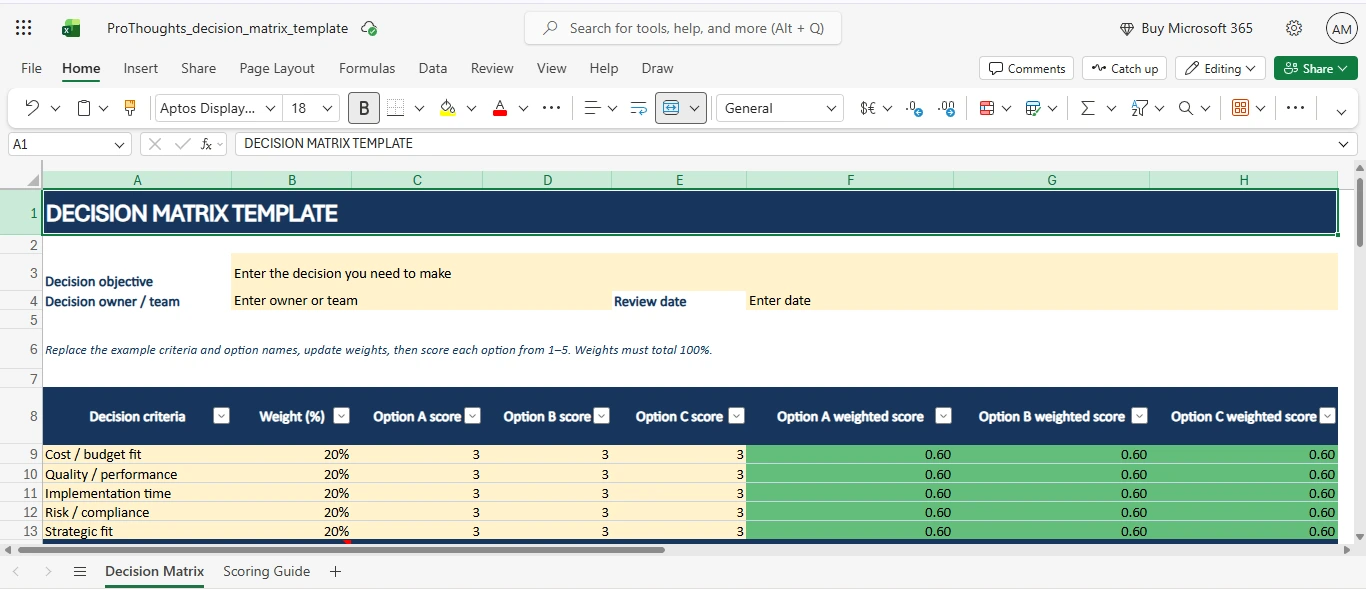
Download the free decision matrix template here
Note: To download the sheet in Excel format, kindly go to the File option in this Google Sheet template, click on Download, and select Microsoft Excel (.xlsx).
Your Decision Matrix Template in Excel will be ready to use.
A weighted matrix helps teams move beyond personal preferences and focus on the criteria that matter most to project success. Here are some of the best decision matrix practices to follow:
- Keep the layout simple: Use clear headings and a well organized structure to make comparisons easy.
- Use consistent scoring: Apply the same scoring scale across all alternatives to ensure fair evaluation.
- Display weights: Make criterion weights visible so stakeholders understand their impact on the final score.
- Highlight recommendations: Add a separate section for the highest scoring option and the final decision.
- Separate requirements from preferences: Check mandatory conditions such as security or compliance before scoring alternatives.
- Document assumptions: Record the reasons behind scores and flag information that needs verification.
Now let’s look at some of the advantages as well as limitations of the decision matrix.
Advantages and disadvantages of a decision matrix
A decision matrix makes complex comparisons easier to explain. It creates a consistent evaluation process and is useful when several options have different strengths and weaknesses.
Below are the advantages and disadvantages of a decision matrix:
| Advantages | Disadvantages |
| Compares alternatives using consistent criteria | Ratings may reflect personal opinions or bias. |
| Weighted scores highlight what matters most. | Poorly assigned weights can distort results. |
| Makes the strengths and weaknesses of options easier to understand. | Complex decisions involve factors that some scores cannot capture. |
| Helps stakeholders discuss options using a common framework. | Defining criteria and scoring many alternatives can take time for reporting. |
| Records how and why an option was selected. | High scores don’t guarantee the option is feasible or risk-free. |
| Excel templates simplify calculations and can be reused. | Small changes in scores or weights may alter rankings when options are closely matched. |
- Risk
- Technical suitability
Each criterion also receives an importance rating in a weighted decision matix.
3. How do you calculate a decision matrix?
To calculate a simple decision matrix, you must:
- List the options and criteria
- Assign scores
- Add the scores
For a weighted matrix, multiply each score by the criterion’s weight and add the weighted values to calculate the final score.
4. Is a Pugh matrix a decision matrix?
Yes, the Pugh matrix is also a decision matrix. It is a criterion scoring matrix used to calculate the best suitable option against a set of baseline criteria.
5. What is the difference between a decision matrix and a weighted decision matrix?
A basic decision matrix gives equal importance to all criteria. A weighted decision matrix assigns different weights to criteria based on their importance. This makes the weighted matrix more suitable for decisions with competing priorities.