Product vs. sprint backlog – Key takeaways
- The product backlog contains work for the product.
- The sprint backlog focuses on the current sprint.
- Product backlog items are ordered and continuously refined.
- Sprint planning connects both backlogs.
- The sprint goal guides sprint backlog selection.
- Developers manage and update the sprint backlog.
- The product backlog can change as priorities evolve.
- The sprint backlog can change as developers learn more.
- Jira helps teams organize and track backlog items.
- Both backlogs support better agile planning and execution.
In project management, both product backlog and sprint backlog are important artifacts. Product backlog provides a broader view of the work that needs improvement. Sprint backlog narrows that work down to what the scrum team plans to work on during a particle sprint.
It is crucial to understand the difference between product backlog vs sprint backlog. While managing projects, it helps teams plan realistically and connect daily work with product goals.
In this blog, you will understand each concept in detail. Let’s start off with understanding the meaning of product backlog.
What is a product backlog?
A product backlog is an ordered list of work that can improve or change a product. It includes any new changes like –
- Adding new features
- Enhancements
- Bug fixes
- Technical improvements
- Research, etc.
Basically, the product backlog gives the team a broader view of what needs to be done. Which items can be added or removed, refined, or reordered? As the product develops, new information becomes available.
For example, consider an e-commerce application. Its product backlog might contain:
- Add user registration
- Improve the checkout process
- Integrate a new payment gateway
- Add product recommendations
- Improve mobile performance
- Fix payment-related bugs
Not all of these items will be worked on immediately. They are ordered based on what is considered most important, helping the team understand what should be considered as work progresses.
The product owner is accountable for effective product backlog management. Including ordering the items and making sure the backlog is understood.
Next, let’s understand what sprint backlog is.
What is a sprint backlog?
A sprint backlog is the set of product backlog items selected for a particular sprint. It includes the plan for delivering them.
During sprint planning, the scrum team considers the product backlog – sprint goal.
With that, what can be reasonably addressed during the sprint. The selected work forms the sprint backlog.
For instance – An ecommerce team starts a two-week sprint. From its broader product backlog, the team selects –
- Improve the checkout process
- Fix a mobile payment issue
- Test the new payment gateway
The team then works out how to approach this work during the sprint. The sprint backlog therefore provides a more immediate view of what the team is working toward.
The developers manage the sprint backlog and update it as they learn more about the work.
Not that we have understood how both product backlog and sprint backlog work. Let’s see the difference between both.
Product vs sprint backlog
The easiest way to understand sprint backlog vs. product backlog is to look at their scope and purpose.
| Difference | Product backlog | Sprint backlog |
| Purpose | Provides an ordered view of work that could improve the product. | Provides a plan for the work selected for the current sprint. |
| Scope | Broader product scope. | Specific to a sprint. |
| Time frame | Ongoing. | Current sprint. |
| Contents | Features, improvements, fixes, technical work, and other product backlog items. | Selected product backlog items and the team’s plan for delivering them. |
| Ordering | Product backlog items are ordered. | Work is selected based on the Sprint Goal and what the team can address. |
| Level of detail | Items can range from broad ideas to well-refined work. | Usually provides enough detail for the team to plan and execute the selected work. |
| Changes | Continuously refined and reordered. | Updated during the sprint as more is learned. |
| Accountability | The product owner is accountable for product backlog management. | Developers manage the sprint backlog. |
| Main focus | What may need to be done for the product. | What the team is working on during the sprint. |
Product vs sprint backlog explained
Product backlog: The product backlog covers work across the product. It is not limited to the next sprint and contains work that may be considered much later. In short, the product backlog keeps on evolving.
Product backlog changes as –
- Priorities
- Customer feedback
- Market needs
- Technical information & other factors
Sprint Backlog: The sprint backlog takes a smaller portion of that work. Focuses the team on achieving the sprint goal during the current sprint.
Sprint backlog supports the current sprint. It gives developers a practical plan for the current sprint. It can evolve as they gain a better understanding of the work.
Next, we will look into how product backlog gets divided into a sprint backlog.
How does the product backlog become a sprint backlog?
The two backlogs are connected through sprint planning.
The basic flow looks like this:
The team does not simply copy the top items from the product backlog. During sprint planning, the team works toward a sprint goal. Then selects product backlog items that support that goal.
The developers then create a plan for delivering the selected work.
This creates a useful connection between broader product priorities and the work happening during the current sprint.
The next section explains product backlog vs. sprint backlog but in Jira.
Product vs. sprint backlog in Jira
Teams using Jira can use its backlog and sprint features to organize work across different stages.
The Jira backlog can be used to view, prioritize, and refine work. During sprint planning, selected items can be added to a sprint. The team can then use the sprint view to track and manage the work during the iteration.
Here’s a visual explanation for product backlog vs sprint backlog in Jira –
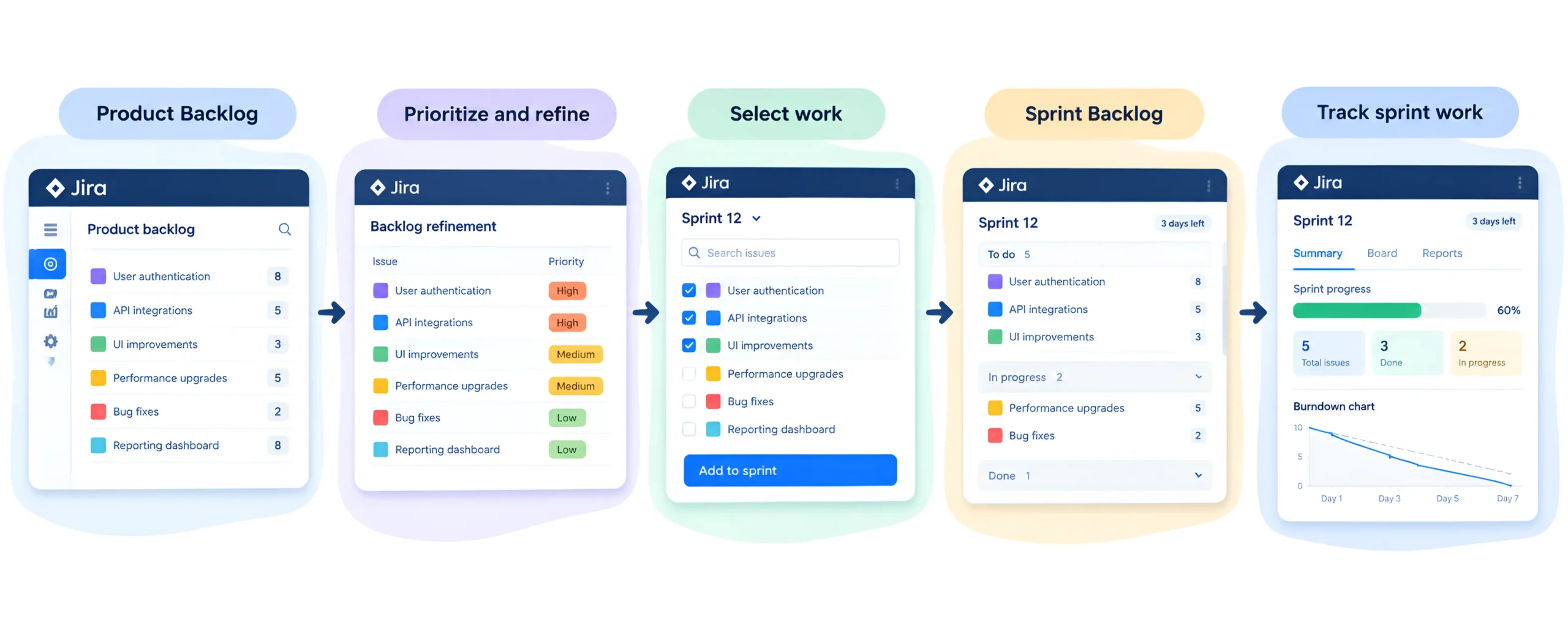
The important distinction remains the same even when a tool such as Jira is used. The product backlog represents the broader product work. While the sprint backlog focuses on the work selected for the current sprint.
If you want to explore how Jira supports broader project management activities. See our guide on Jira software for project managers.
Let’s understand how a product owner manages product and sprint backlogs.
How to manage product and sprint backlogs effectively
Managing both backlogs does not require complicated processes. The main goal is to keep each one useful for its purpose.
1. Keep the product backlog ordered
The product backlog should make it clear which work is more important to consider next. Ordering can change as new information becomes available.
2. Refine upcoming work
Teams should spend enough time understanding and refining upcoming product backlog items. This makes it easier for the team to discuss during sprint planning.
3. Keep the sprint goal visible
The sprint backlog should support the sprint goal. It shouldn’t become a collection of unrelated tasks.
4. Update the sprint backlog as work progresses
Developers may discover new information after work begins. Updating the sprint backlog helps maintain an accurate picture of the work remaining.
5. Avoid unnecessary backlog clutter
Old, duplicate, or no-longer-relevant items can make a backlog difficult to use. Regular refinement helps keep attention on meaningful work.
Next, we will cover the common misunderstandings about product and sprint backlogs.
Product vs. sprint backlog: Common misunderstandings
1. Misunderstanding no. 1
“The sprint backlog is just a smaller product nacklog.”
Not exactly. It contains selected product backlog items. ut it also includes the plan created by the developers for achieving the sprint goal.
1. Misunderstanding no. 2
“The product backlog cannot change during a sprint.”
It can change. The product backlog is continuously refined and reordered as circumstances and information change.
1. Misunderstanding no. 3
“The sprint backlog cannot change.”
Srint backlog can be updated as the developers learn more about the work. The sprint goal provides the focus for those changes.
1. Misunderstanding no. 4
“The highest-priority product backlog item must always be selected.”
Not necessarily. Sprint planning considers the sprint goal and what can reasonably be addressed during the sprint. You shouldn’t simply take items based on their position in the list.
Conclusion
We hope by reading our article on product backlog vs sprint backlog helped you understand how these serve different purposes in agile project management.
Understanding this difference helps teams to plan better and stay focused on the sprint goal. It also helps PMP project managers, product owners, and scrum teams to manage work with better clarity.
If you are building your project management skills. Understanding agile practices is useful alongside formal PMP certification. If you’re working closely with scrum teams, you can explore agile certification paths. This will help you strengthen your professional profile and knowledge of agile ways of working.
Product vs. sprint backlog: FAQs
Here are some commonly asked questions regarding product backlog vs sprint backlog.
1. Is the sprint backlog a subset of the product backlog?
Yes, the work selected for the sprint backlog comes from the product backlog. The sprint backlog also includes the developers’ plan for delivering the work during the sprint.
2. Who manages the product backlog?
The product owner is accountable/responsible for effective product backlog management. Including ordering the items and ensuring the backlog is understood.
3. Who manages the sprint backlog?
The developers manage the sprint backlog. They update it as their understanding of the work changes during the sprint.
4. Can the product backlog change during a sprint?
Yes. The product backlog is continuously refined and reordered as new information becomes available.
5. Can the sprint backlog change during a sprint?
Yes. Developers can update the sprint backlog as they learn more about the work. Changes should remain aligned with the sprint goal.
6. What is the difference between a product backlog and a sprint backlog in Jira?
In Jira, the product backlog can be used to organize and prioritize broader product work. While the sprint backlog contains the work selected for a particular sprint.