Key Takeaways of Risk Register in Project Management
- A risk register allows project managers and teams to identify and track project risks.
- It is maintained throughout the project lifecycle and even after the project’s completion.
- A risk register template is a reusable document that can be customized as per the project details and requirements.
- A risk register includes risk ID and risk description, risk category, impact, risk score, risk response, owner, and risk status.
- Risks can be related to various project aspects, like project scope, cost, resources, etc.
- Risk registers can be created by identifying and assessing the impact of risks.
- Further, assigning an owner to the risk and formulating an action plan is necessary.
- Risk registers are crucial for the risk management of all projects.
Projects are susceptible to risks at all phases throughout the project lifecycle. A project risk register is a document that tracks potential risks of a project. It is a non-negotiable tool in most project managers’ arsenal.
A risk register template is a reusable document that allows easier risk identification and management for project teams. It helps project managers document risks, assess their potential impact, assign ownership, and plan appropriate responses.
So let’s explore what is a risk register in project management with a risk register in project management example. We’ll also provide you with a risk register template to make your job easier. So let’s begin!
Risk Register in Project Management
A risk register in project management is a document used to identify and manage potential risks that may affect a project. It contains important information about each risk and its impact to formulate a response strategy.
The risk register is not a document that is created once and then forgotten. It is a living document that should be updated as the project progresses. New risks can emerge during execution and existing risks may change in probability, impact, or status.
A risk register therefore gives the project team a central place to understand the risks that may affect project objectives. It also makes it easier to assign responsibility and track what is being done about each risk.
Now let’s look at a simple risk register in a project management example.
Risk Register in Project Management Example
Consider a software development project where the team is preparing to launch a new application. During risk identification, the project team identifies a few potential risks:
Risk Register Example |
|||||
|---|---|---|---|---|---|
| Risk | Probability | Impact | Response | Risk Owner | Status |
| Vendor may delay a critical software component | High | High | Identify an alternate vendor and track delivery milestones | Procurement Manager | Open |
| Key developer may leave the project | Medium | High | Cross-train another team member and document critical work | Project Manager | Open |
| Key developer may leave the project | Medium | High | Establish a change control process | Business Analyst | Open |
This is a simple project management risk register example. The exact columns can differ according to the project and the organization. The important part is that each risk has enough information for the team to understand what could happen and how serious it could be to assess what needs to be done.
The register can then be reviewed during project meetings. As risks change, their status, owners, probability, impact, and response plans can also be updated.
This brings us to the different types of risks that project teams may need to track.
Types of Risks to Track in a Risk Register
Risks can come from almost any area of a project. The types of risks you identify depend on different aspects of the project and the project environment. However, some risk categories are common across projects. They’re mentioned as follows:
1. Schedule Risk
- Schedule risks can affect the project timeline and planned milestones.
- They may arise due to delays in activities or dependencies and resource unavailability.
- If a project activity takes longer than its estimated time, other dependent tasks can experience hindered progress.
- A risk register can help the project manager and team stay ahead in taking preventive measures for such schedule delay risks.
2. Cost Risk
- Cost risks can affect the project budget at large.
- These may arise due to inaccurate estimates, unexpected expenses, or changes in scope that increase the resource costs.
- Risk registers are predominantly used to avoid cost and budget overruns.
- Project teams assess their potential financial impact and plan an appropriate response by tracking these risks.
3. Resource Risk
- Resource risks are related to the availability or capacity of people required for the project.
- A key team member becoming unavailable during an important phase can affect project progress.
- Resource risks may also occur when the project does not have enough skilled professionals to complete planned activities.
4. Technical Risk
- Technical risks can arise from technology or systems and infrastructure requirements that threaten to remain unmet.
- These risks are important in software and technology projects.
- Compatibility problems or technical limitations can affect both the schedule and quality of project deliverables.
- Risk registers aim to track such risks and find alternative solutions for such situations.
5. Scope Risk
- Scope risks occur when the project requirements are unclear.
- They can also happen when there are frequent changes to the agreed scope.
- Uncontrolled scope changes can increase the amount of work required and may affect the project’s schedule, cost, and resources.
6. External Risks
- Some risks originate outside the project team’s direct control due to external requirements.
- These may include regulatory changes, market conditions, or supplier problems.
- Project teams should monitor such risks because external factors can affect project objectives even when internal activities are progressing as planned.
By identifying these risk categories, the project team gets a starting point for risk identification. As the register captures important information about each risk. So now let’s look at what to include in a risk register.
What to Include in a Risk Register
A risk register should contain enough information to help the project team understand and manage each potential risk. The exact format can vary, but some key components of a risk register are:
1. Risk ID and Risk Description
- Each risk can be given a unique ID such as R-01 or R-02. This makes it easier to refer to a specific risk during project discussions.
- The risk description should describe the potential risks in clear detail. It should not be so broad that the team is unsure about what could happen.
2. Risk Category
- A risk category within a risk register helps group similar risks together.
- Risks may be categorized as schedule, cost, technical, resource, scope, external, or according to the organization’s own risk structure.
- This makes it easy to identify areas where the project may have a higher concentration of risks.
3. Probability
- Probability refers to the likelihood of the risk occurring.
- Organizations may use different scales to assess probability. A simple approach is to classify risks as low, medium, or high.
- Some teams may use a numerical scale or a colour-coded range instead.
4. Impact
- Impact refers to what could happen to the project if the risk occurs.
- The impact may affect the schedule, cost, quality, or other project objectives.
- Impact can also be assessed using a qualitative or quantitative scale.
5. Risk Score
- Risk scores help the project team with prioritizing risks.
- The scoring system should be consistent across the project for effective comparison.
- A common approach is to multiply probability by impact. For example, if both probability and impact are scored on a scale of 1 to 5, a risk with a probability score of 4 and an impact score of 5 would have a total risk score of 20.
6. Risk Response
- Risk response explains how the project team will manage the risk.
- The team may choose to avoid, mitigate, or respond to the risk as per the organization’s project risk management approach.
- The response must be practical and explain the next course of action.
7. Risk Owner
- Every important risk should have an assigned owner.
- The risk owner is responsible for monitoring the risk to ensure the planned response is being carried out.
- When you assign ownership, you also prevent risks from becoming everyone’s responsibility and therefore no one’s responsibility.
8. Risk Status
- The status helps the team understand where the risk currently stands.
- A risk could be open, under monitoring, stable, escalated, closed, or have another status based on the organization’s process.
These components help turn the risk register from a simple list into a useful project management tool.
So, how can you organize all this information in a practical format? That’s where a risk register template comes in. Let’s look at the free downloadable risk register template next!
Risk Register Template in Project Management
A risk register template in project management provides a standard structure for recording and managing risks. It allows project teams to use a reusable format and adjust it according to their needs, rather than creating the register from scratch for every project.
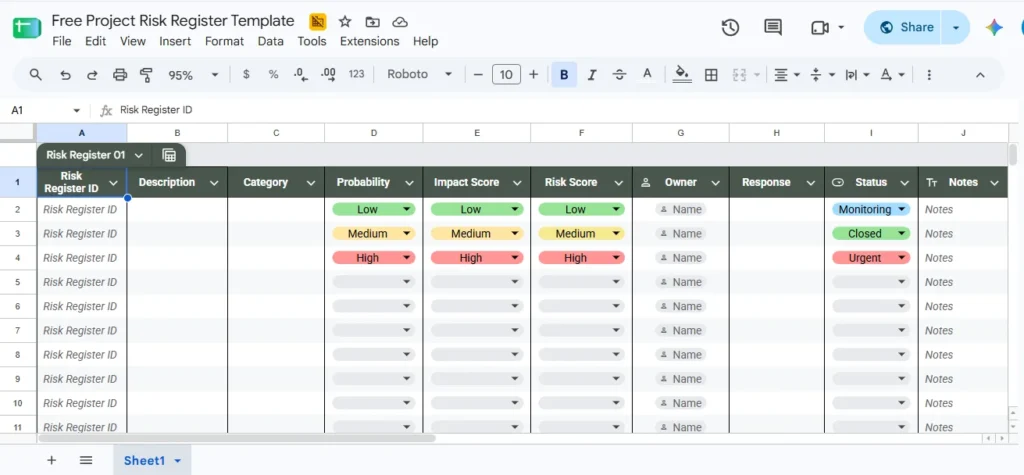
Download Free Risk Register Template Here
The free risk register template above can be adapted based on the complexity of your project. A smaller project may only need a few columns, while a large project may require additional information such as:
- Risk triggers
- Mitigation actions
- Contingency plans
- Residual risk
- Target dates
- Comments
The main purpose of using a template is to maintain consistency, as it enables easier tracking. A template also assists new team members and project stakeholders in understanding how risks are being documented.
You can use the above structure as a starting point for your own risk register template and add or remove fields based on your project requirements. Now let’s look at how you can actually create and maintain one in detail.
How to Use a Risk Register Step by Step
While creating a risk register, the project team must do more than just fill out a table. There must be a structured process to identify and manage risks throughout the project. Here are the steps to create a risk register:
1. Identify Potential Risks
- Start by identifying the risks that could affect the project.
- The project team can use:
- Brainstorming sessions
- Stakeholder discussions
- Lessons learned from previous projects
- Project documentation
- Expert input
- Try to involve people from different areas of the project.
- Different team members may identify risks that others may not have considered.
2. Document the Risks
- Record each risk in the risk register after identifying it.
- Give each risk an ID and provide a clear description.
- Add the relevant category and information about the potential cause or effect.
- The goal at this stage is to make sure the team has a common understanding of each risk.
3. Assess Probability and Impact
- Assess each risk and its impact on the project.
- Employ a consistent scale to compare risks and determine which one requires more attention.
- A high probability and high impact risk will require more immediate attention than a low probability and low impact risk.
4. Plan the Risk Response
- Decide how the project team will respond after the risks have been assessed.
- The response should address the specific risk rather than simply stating that the risk will be monitored.
- For important risks, the team should also identify the actions required to implement the response.
- This gives the team something practical to act on if the risk begins to develop.
5. Assign a Risk Owner
- Assign a person who will be responsible for monitoring each risk.
- The owner should understand the risk and have enough authority and access to coordinate the required response.
- Named owners also create accountability within the team for each risk.
6. Monitor and Update the Register
- Risk management does not stop after the initial risk identification exercise.
- New risks can appear as the project progresses. Existing risks can also become more or less likely. Some risks may be closed after the response is completed.
- Therefore, the risk register should be reviewed regularly during project meetings and milestone reviews.
- Updating the register helps ensure that the team is working with current information instead of relying on risks that were identified only at the beginning of the project.
The risk register can therefore support the project from initiation through execution and closure. It becomes a central record of how the project team is identifying and responding to uncertainty.
Conclusion
Risks are a natural part of project management. It is the project manager and team’s job to ensure the project is protected against risks by using all means to identify and manage them.
A risk register is an important risk management tool in project management, as it provides a structured format for handling each potential risk to a project. It simplifies presenting risk updates to the project stakeholders and teams.
But the most important thing to remember is that a risk register should not be treated as a one-time document. It should evolve throughout the project lifecycle as new risks emerge and existing risks change.
So, if you want to build your project management skills and prepare for the PMP exam, explore our PMP certification training.
FAQs on Risk Register in Project Management
Here are some of the frequently asked questions on risk register in project management:
1. What is a risk register in project management?
A risk register is a document used to identify and manage potential risks that may affect a project. It provides project managers and teams with information necessary to mitigate risks and their impact on the project.
2. What are the key components of a risk register?
A risk register includes numerous details of a potential project risk for its tracking and management. The common components of a risk register include:
- Risk ID
- Risk description
- Risk category
- Probability
- Impact
- Risk score
- Risk response
- Risk owner
- Risk status
The exact components can vary as per the project and its risk management process.
3. What is the difference between a risk and an issue?
A risk is an uncertain event that may happen in the future and could affect the project. Whereas an issue is a problem that has already occurred and requires action.
A risk register is therefore used to track potential future events, while an issue log is used to track problems that have already materialized.
4. Why is a risk register important in project management?
A risk register gives project teams a central place to document and monitor risks. It supports proactive risk management by helping teams identify potential problems before their impact affects the project’s quality or progress.
5. How often should a risk register be updated?
A risk register should be reviewed and updated regularly throughout the project lifecycle. The frequency can depend on the project, but it can be included as part of regular project status meetings and milestone reviews.
New risks should be added, existing risks should be reassessed, and risks that are no longer relevant must be closed.